New Features
Three new assistant skills
Your VoiceLine assistant — the one you call on the phone — can now do things for you, not just capture what you tell it. Three new skills are live today, all built for the same moment: you’re on the road, your hands are busy, and the most useful thing you can do is prepare for what’s coming or make a call.Pull up your last visit or call
Ask the assistant what happened the last time you were with a customer, and it finds your most recent visit report or call log for that account and reads it back or summarises it. Ask follow-up questions to dig into a specific part.Just say: “Pull up my last meeting with ACME and give me a summary.”Why this matters in the field. It turns documentation into something you get back. The report you dictated after last month’s visit is what briefs you in the car park five minutes before the next one — no laptop, no scrolling through the CRM. The more you document, the better prepared you are, and the work compounds instead of disappearing into a system.Call any contact in your CRM
Ask the assistant to call someone, and it finds the contact and puts the call through. It reads the contact back to you before dialling, so you know exactly who you’re about to reach, and it places the call from your own number — so your contact sees a number they recognise.Just say: “Find Thomas Smith at ACME in Boston and call him for me.”Why this matters in the field. Your CRM holds thousands of numbers; your phone’s address book holds a fraction of them. Time behind the wheel is some of the best calling time you have, and this is what makes it usable — no searching, no typing, hands stay on the wheel. The assistant can only dial numbers that are actually in your CRM, and it tells you plainly when one is missing or unusable.Send reminders by voice
Reminders drop a to-do straight into your calendar in seconds — but until now you still had to pick up your phone to send one off. Now, when you create a reminder in a call with your assistant, it simply asks whether it should send it for you. Say yes, and it’s done.Why this matters in the field. The to-do you think of between two meetings is the one most likely to be lost. Capturing it and filing it in the same breath — without ever opening the app — is what turns it into something that actually happens.We started with reminders deliberately: a reminder only ever goes back to you, so nothing can reach a colleague, a customer, or your CRM by mistake. More workflows will follow.Your assistant understands natural language, so the examples above are a guide rather than a script — ask in your own words and it will follow.Not seeing one of these skills? Some workspaces have them held back at the request of the customer’s own CRM administrator or project lead, so this is usually a deliberate setting rather than a fault. If you’d like a skill enabled, speak to your workspace admin or email us at support@getvoiceline.com.Available with Field Sales Fundamentals. Read more
New Features
Competitor Analytics
Competitor Analytics leaves closed beta today and is available to all users. Every field visit your team records now doubles as competitive intelligence — showing which competitors come up most, where they’re winning, where they’re vulnerable, and which of your accounts are open to switching.Competitors come up in the field every day: in visit reports, in call logs, in passing. Until now that signal sat in individual recordings and was impossible to see as a whole. VoiceLine extracts and classifies it automatically across your entire team, so you get a live picture of the market without asking reps to fill in a single extra field.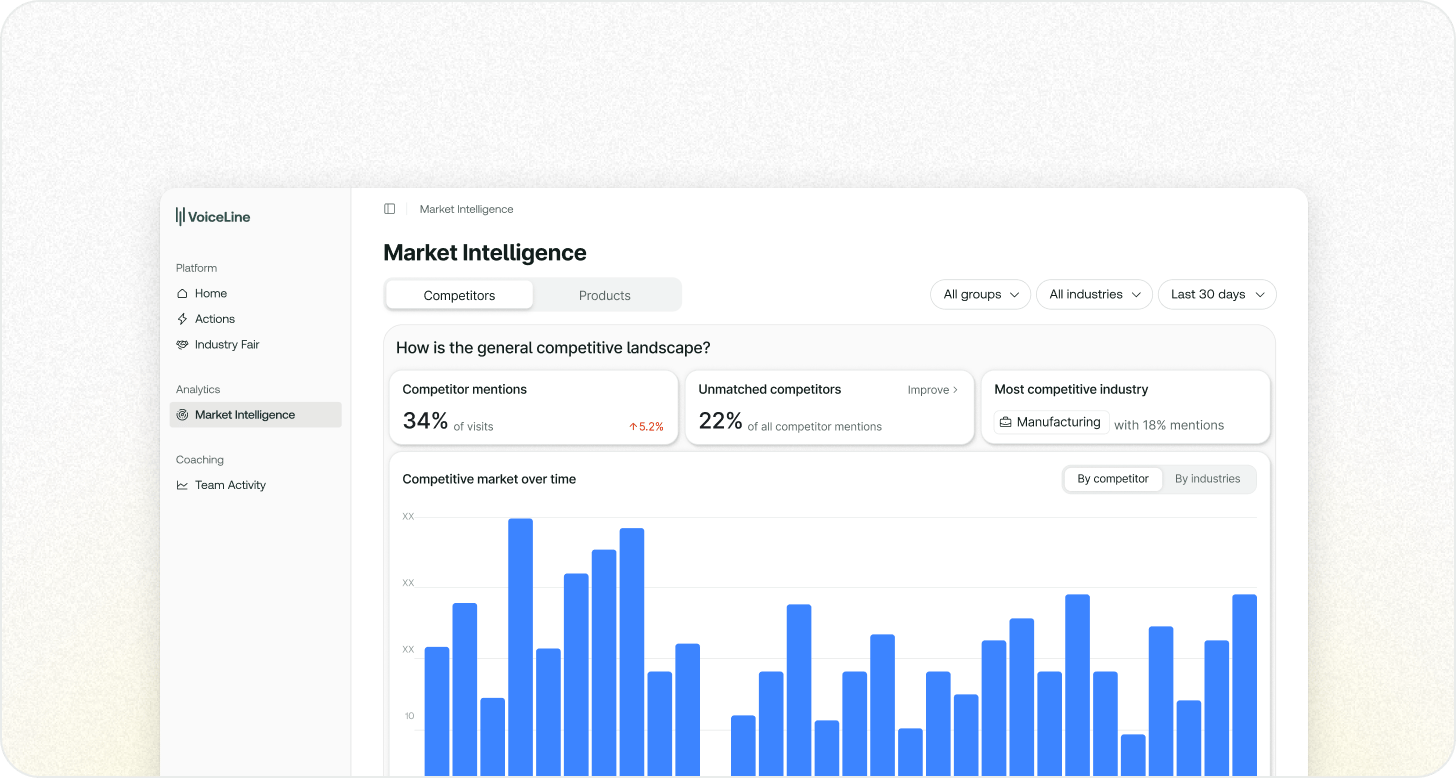
- The competitive landscape — how often competitors are mentioned at all, how many names don’t yet match your competitor list, which industry is most contested, and how all of it develops over time (by competitor or by industry).
- Top competitors and how they perform — your most-mentioned competitors ranked with customer sentiment, plus a strengths-and-weaknesses breakdown across price, product quality, service, and delivery.
- Where your customers are buying from — which accounts currently source from each competitor, and which ones have signalled they’re open to switching.
- Objections linked to competitors — where competitors are actively blocking your deals, and the concrete openings to win them back.
Retiring the Market Radar tile
As part of this release we’re retiring the legacy Market Radar tile. It’s being replaced by our new suite of analytics features — Competitor Analytics is the latest of them, with more Market Intelligence features on the way in the coming weeks.New Features
Web Actions Editor
One of our most-requested features is here: you can now review, edit, and submit your CRM actions from the web app — not just on mobile. The Actions Hub (also known as the Web Editor) gives you a single place on your desktop to work through everything your recordings generated, with a full keyboard and a big screen.Capture by voice on the go, then sit down at your PC to polish properly. Open Actions in the web app sidebar to see every action organised across three tabs — Open, Scheduled, and Done — grouped by date so recent activity is easy to find. A badge shows how many items need your attention, including past meetings from the last 30 days you haven’t yet recorded a VoiceLine for.Select any recording to open the detail view, where the original recording and transcript sit alongside each generated action. From there you can edit any field, submit one or all actions to your CRM, delete actions you don’t need, reschedule reminders, or create additional actions from the same recording. Missing required fields are flagged before you submit.The Actions Hub complements the mobile assistant rather than replacing it — edits sync between both, so you can start on your phone and finish at your desk.Available with Field Sales Fundamentals. Read moreNew admin tools
We’ve added a set of tools that give workspace administrators more direct control over their workspace — without a support ticket.CRM Logs
CRM Logs show everything VoiceLine has sent to your CRM, along with your CRM’s technical response for each action. When a visit report doesn’t appear where you expect it — for example because it synced to a duplicate account — your IT team can now see exactly what was sent and how the CRM responded, and diagnose it themselves. Access is controlled by the Admin Tools permission.Available with Field Sales Fundamentals. Read moreFine-grained permissions
Workspace administrators can now assign individual permissions to each user, independent of their role, for precise control over who can access which features. Permissions cover areas such as User Management, Analytics, Playbooks, Transcriptions, and Org Structure — so you can tailor access to how your team actually works. Read moreLicense Management
License Management gives administrators direct control over who holds a paid seat. Assign and free seats, lock a user’s access without giving up their seat (and later restore it exactly as it was), and see when each user last opened the app to spot inactive seats at a glance. You can also create Inside Sales users directly, without a separate request. Read moreNew Features
Analytics & Coaching Platform — Open Beta
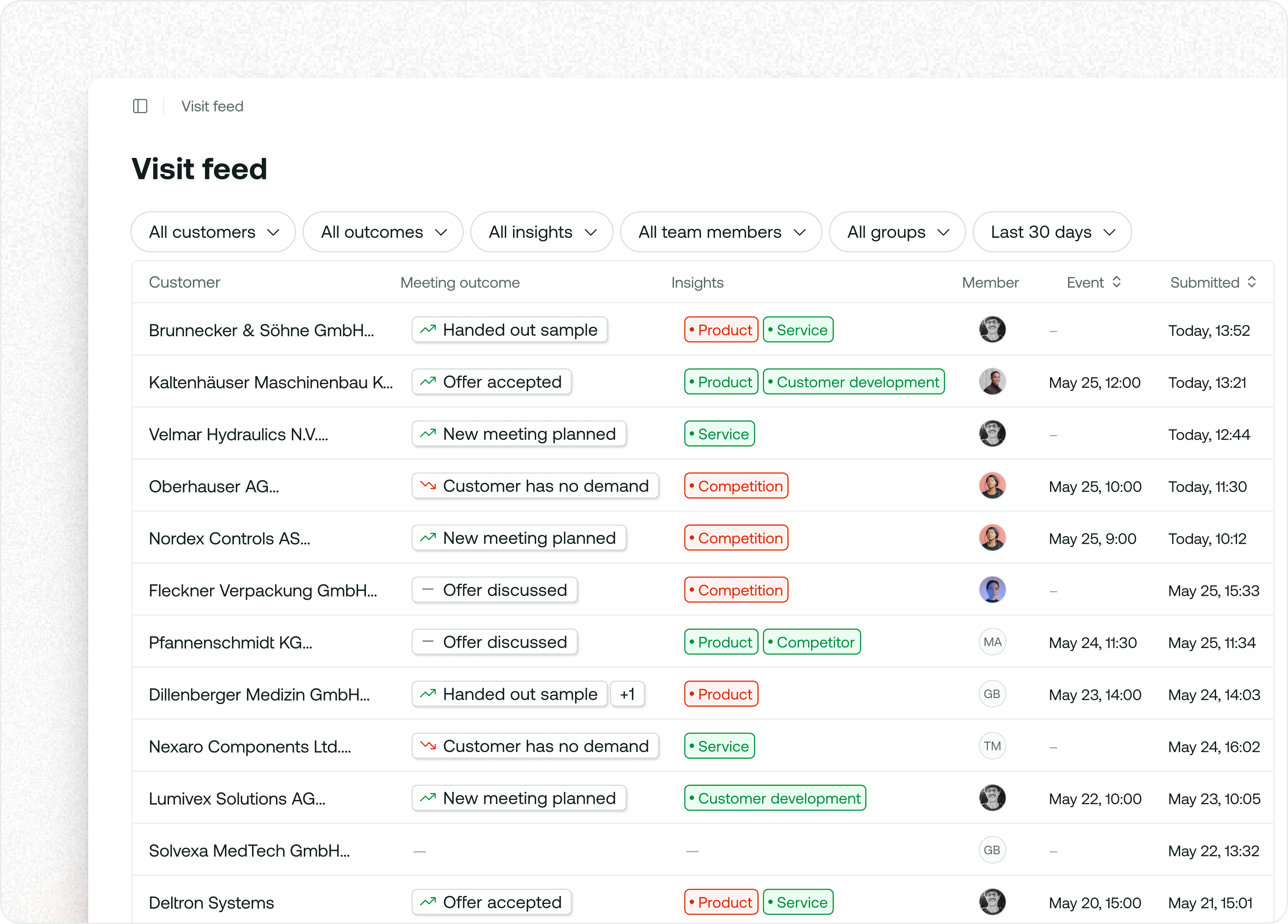
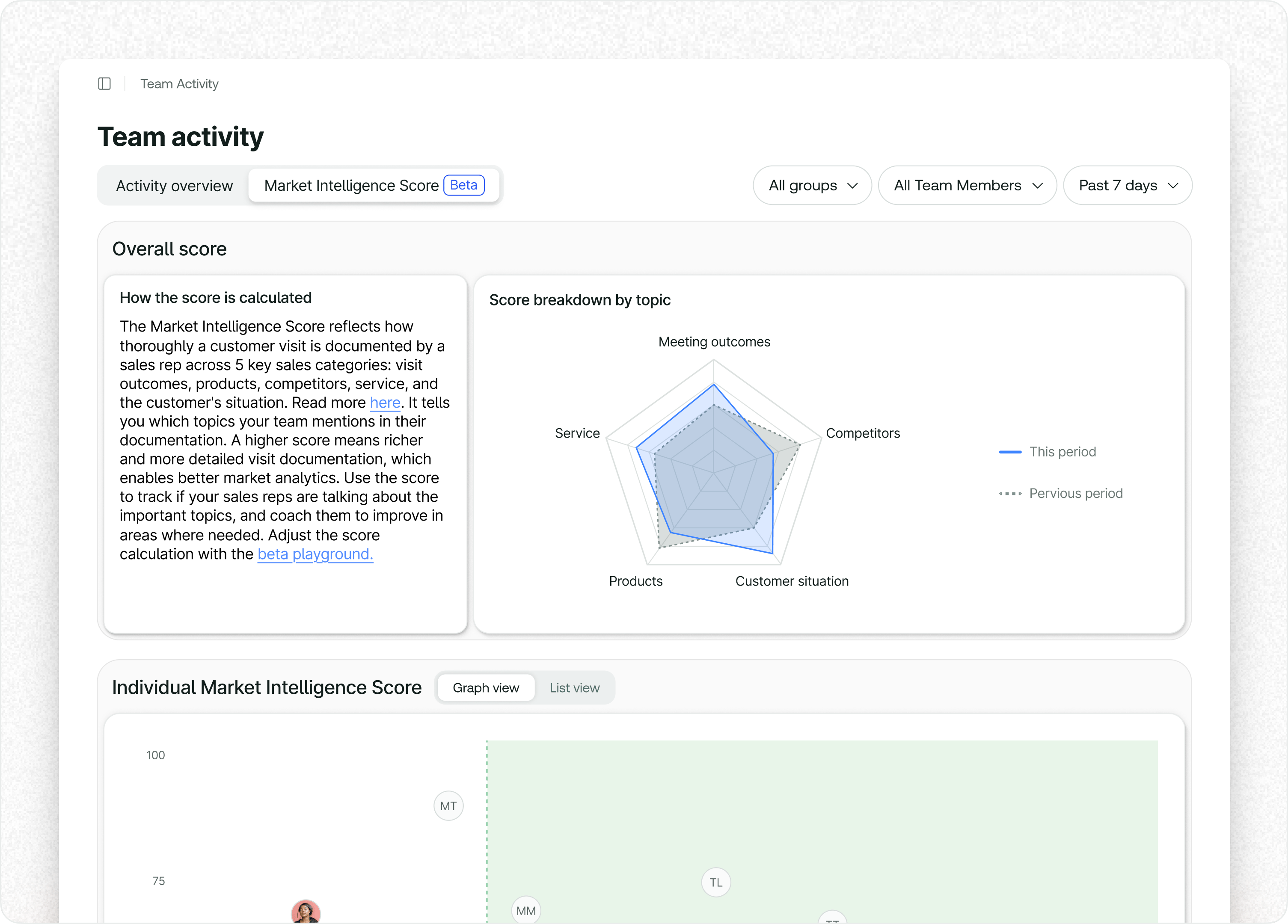
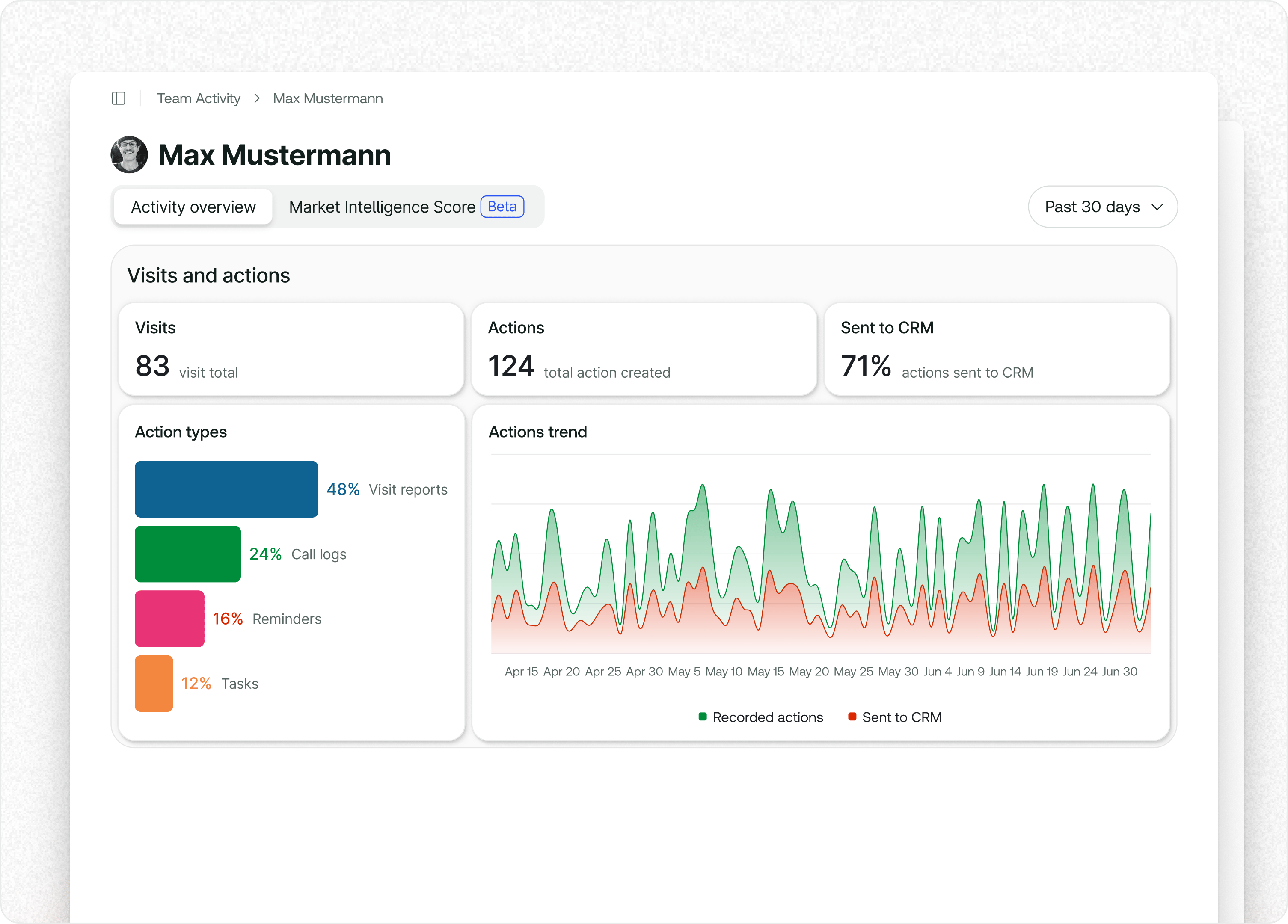
The VoiceLine Analytics & Coaching Platform moves to open beta today. Three dashboards are now available to all users, replacing the legacy Market Radar and Discover Insights views.Visit Feed
Market Intelligence Score
User Profiles
The following features remain in closed beta and are not yet available to all users. Contact your CSM to request early access:
- Playbooks — structured question sets that guide reps through visits and track coverage against manager-defined topics
- Competitor Trends — automatic extraction and sentiment analysis of competitor mentions from field recordings
- Product Trends — product mention tracking, unmatched term resolution, and continuous recognition accuracy improvement
- Visit Performance — visit-to-outcome conversion metrics tracking the share of visits that produce an offer, order, or new opportunity
New Features
Match unmatched products from the admin interface
Reps mention products by shorthand, abbreviations, and trade names that don’t always match your catalogue exactly. Until now, those mentions sat in Workspace Settings → Unmatched Terms with no easy way to resolve them.Admins can now click Match Product next to any unmatched term, search the full product hierarchy, and save the term as an alias. All future occurrences are matched automatically, and previously recorded unmatched mentions of the same term are reclassified — no re-sync required. The full product hierarchy is also browsable and searchable in the same view.This closes the loop between Product Analytics and your product catalogue, so your recognition coverage improves continuously without engineering work.Available as part of Market Analytics in your platform package. Read moreMatch unmatched competitors and create new ones in one click
When VoiceLine detects a competitor reference that doesn’t match any entry on your list, the mention is saved as an unmatched competitor. You can now resolve these directly from Workspace Settings → Unmatched Terms → Competitors:- Match to an existing competitor — search by name or alias and save the term as an alias on the matched competitor.
- Create a new competitor — the unmatched term is pre-filled as the first alias, ready for you to add a name and save.
Live updating actions in the Actions Hub (Beta)
The Actions Hub now updates in real time as VoiceLine processes a recording. Open the detail view on any voiceline and watch CRM actions, transcripts, and statuses appear and refine themselves as processing progresses — no need to refresh the page or wait for the full bundle.Currently in Beta under Beta Features → Actions in the web app. Read moreImprovements
Actions Hub background refresh
VoiceLine now performs a lightweight sync each time the web app or mobile app comes back into focus and at regular intervals, fetching only what changed since the last refresh. The Actions Hub stays current as you switch between tasks or return from a call — without a full reload or manual refresh. Read moreCoaching analytics: new layout and charts
The Team Activity and Visit Analytics dashboards have a new bento layout with unified bar charts and a scatter chart for richness comparisons across reps, making coaching patterns easier to read at a glance. Read moreCompetitor analytics: filters and responsiveness
The Competitor Analytics insights page is now responsive and ships with a redesigned filter panel, refined drop shadows, and clearer block titles, making it easier to cut data by time period, rep, or product. Read moreActive date filter highlighted in fair details
When you filter to a specific day on the fair detail page in Industry Fair Mode, the active filter is now visually highlighted so you don’t lose track of your selection. Read moreMobile critical update prompt
The mobile app now blocks usage and prompts an update when the installed version falls below the supported minimum, ensuring every user is on a release that includes the latest reliability and recognition improvements.Submission info on the report builder
Reports submitted from the report builder now include a description field, so reps can add context to the submitted action without editing the report form itself. Read moreVoice agent improvements
The phone-based assistant agent is now more expressive, retranscribes when a timeout occurs mid-session, and allows more time when reps spell out names or product codes. Read moreGeneration profile change indicator
The blue dot on the generation profile modal now only appears when there are actual unsaved changes, reducing visual noise when reviewing profile settings.Playbook questions in visit prep emails
Pre-visit briefing emails now include the playbook questions assigned to the rep for the upcoming meeting, matching the in-app and phone-callback experience. Read moreBug Fixes
Playbooks
- Fixed playbook questions always displaying in German regardless of the user’s app language; questions now appear in the user’s selected language.
- Fixed the playbook analytics page treating the same question as separate entries when responses were captured in different languages.
- Fixed the voice assistant prompting reps to answer playbook questions during visit preparation; it now reads out the questions without asking for a response.
- Fixed an empty state not rendering correctly in the playbook analytics browser.
Actions and voiceline detail
- Fixed an incorrect voiceline type classification in the actions detail modal.
- Fixed mixed-language translations and broken AI summaries in the actions detail view.
Recording and navigation
- Fixed sorting on the product alias mentions table.
- Improved mobile audio recording stability: audio session warm-up prevents recording freezes, removed a reinitialisation step that caused hangs, and added safer error handling for busy audio streams.
- Fixed offline navigation state so the offline drawer no longer crashes after route changes.
- Fixed a clipboard hang on iOS by replacing autofocus with a post-frame callback.
New Features
Playbooks (Closed Beta)
Playbooks let managers define what should be covered in every customer meeting and track how consistently it’s happening. A playbook is a set of questions a manager assigns to a rep segment; questions appear automatically on the recording screen as a lightweight guide, never mandatory, and multiple active playbooks are merged into one deduplicated list per rep.Playbook Analytics shows coverage rates, completion, and the actual responses captured — so managers can see not just whether reps follow playbooks, but what the market is saying.Available with Field Sales Fundamentals (single playbook) and Sales Coaching Pro (multiple playbooks with audience targeting). Contact your Solutions Architect to enable. Read moreVisit Analytics (Closed Beta)
Visit Analytics gives field managers a structured view of what’s happening across their team. It surfaces activity through three connected dashboards:- Visit Feed — a filterable table of your team’s recent visit reports
- Visit Performance — shows the share of visits that produced an offer, order, or new opportunity
- Visit Richness — scores how thoroughly reps document conversations across five categories: meeting outcome, product, customer development, service, and competition
Competitor Analytics (Closed Beta)
Competitor Analytics automatically extracts competitor mentions from visit reports and call logs and surfaces them in a dashboard. It shows mention share, sentiment trends, pricing feedback, and a radar scored across five dimensions:- Price
- Quality
- Service
- Delivery
- Support